
Will AI replace my accountant?
Can local AI models handle invoice processing on consumer hardware — no cloud, no API bill, no invoice leaving the building? Mostly yes, even layouts they've never seen. The useful finding was where they don't belong: a script matched a transaction in 30ms, the model in 30 seconds.
TL;DR
- Running local large language models (LLMs) on consumer hardware, raises the question "how little AI can I get away with?" rather then "can a local model do this?".
- During my testing, I concluded that local LLM models managed to extract data surprisingly well, including from scanned images — but at an 80–90% success rate (guesstimating 🧐), not 100%.
- Model choice matters, and structured output matters more: same model, same file, same prompt, 3m45s became 1.92s once I specified the output format.
- LLMs are non-deterministic. The same input can produce different outputs, which is fine for a summary and not fine for an expense report.
- With privacy in mind, in all my experiments no invoice has left my computer.
Why local, and why invoices?
Before anything else: there is a reason to care about local models specifically beyond cost. An invoice is one of the more sensitive documents a business handles. It carries vendor names, bank details, payment terms, addresses, and once you have a lot of them, a fairly complete picture of what a company spends money on and who it works with. That is exactly the category of data that finance teams cannot paste into a third-party API without a procurement review, data processing agreement, and in some cases a conversation about where the servers are located.
So the question I wanted to answer wasn't "can a frontier model read an invoice?", obviously it can. The question was whether a model running entirely on a personal computer (without hardware that costs millions of €/$) can do it well enough to build a workflow on... with no data egress, no vendor agreement, and no per-token bill. Spoiler alert: mostly yes, with caveats that turn out to be the interesting part.
Background context
With the ever-increasing AI hype, I wanted to see for myself and experiment with AI for a business workflow automation. The problem that I want to solve is invoice processing. There are plenty of SaaS applications available to handle this already as parsing invoices, matching them is a common finance task. To make things more interesting, I wanted to experiment with local models and see how far that gets me. Writing this in the summer of 2026, I'm genuinely impressed by the reasoning capabilities of local models.
The opportunity
I started with a simple workflow: take a couple of invoices using different templates and ask the local LLM model to extract the total amount excluding VAT, the VAT amount and the total amount including VAT.
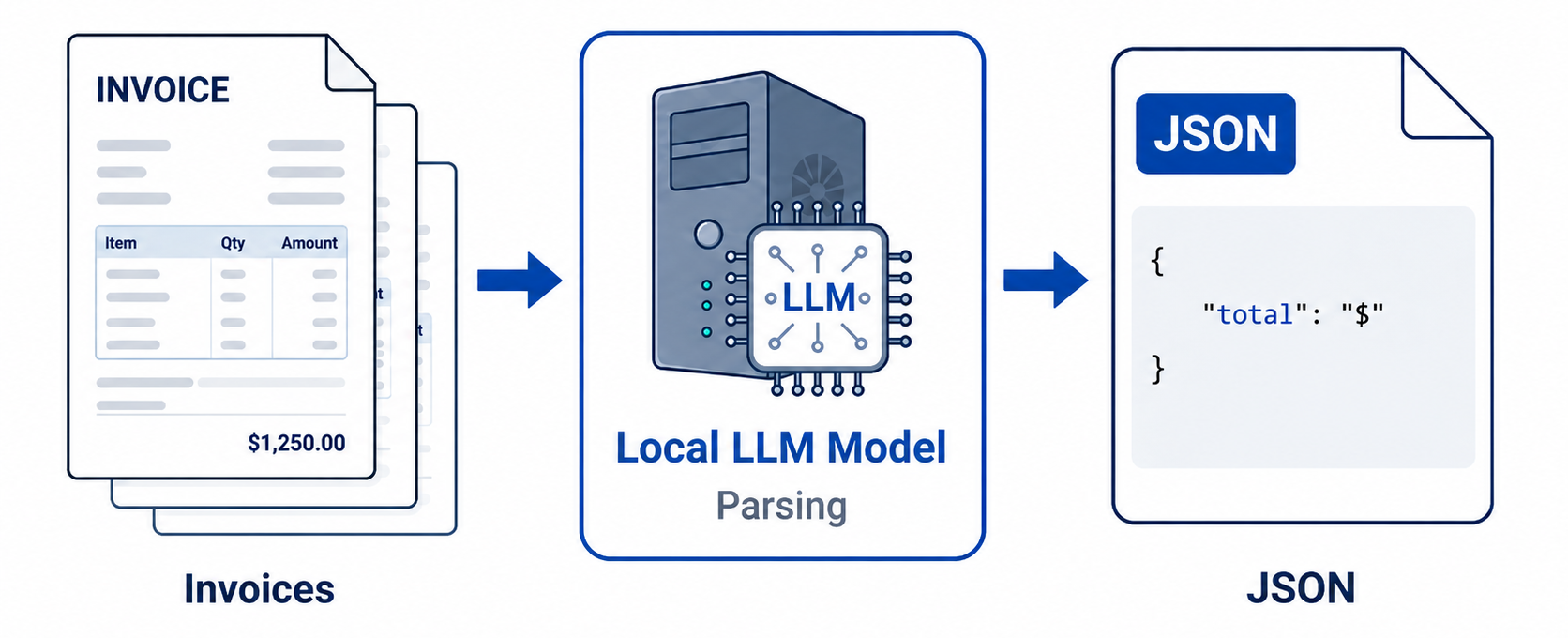
After some more research and experimentation I have discovered an important thing related to invoices. Some invoices are just text documents exported to PDF, where the words and numbers are embedded in the file, so the model reads the contents directly and pulls out the values. Others are scans or photos of printed invoices, which are just images. That's where Optical Character Recognition (OCR) comes into play, it will analyze the image and identify words and numbers. Conveniently, some models can do this themselves, which I have tested as well.
The setup
I used LM Studio on my M4 iMac with 24Gb or RAM. The total available memory for models is around 17 Gb, similar also to a dedicated video card with 16Gb of memory. For my tests I chose the following models:
- qwen/qwen3.5-9b (Min. req. 7Gb Ram)
- google/gemma-4-e4b (Min. req. 6Gb Ram)
- openai/gpt-oss-20b (Min. req. 12Gb Ram)
In terms of performance, I managed to get on average 20 tokens/second with qwen and Gemma 4, whereas with gpt-oss I managed to get an average of 30 tokens/second. I also ran the same models on an M2 MAX Mac Studio and got roughly double the tokens/second across the board, thanks to the higher memory bandwidth. I'd also expect a mid-range graphics card, like the RTX 3060 TI, or the RTX 5060 TI to perform equally or slightly better.
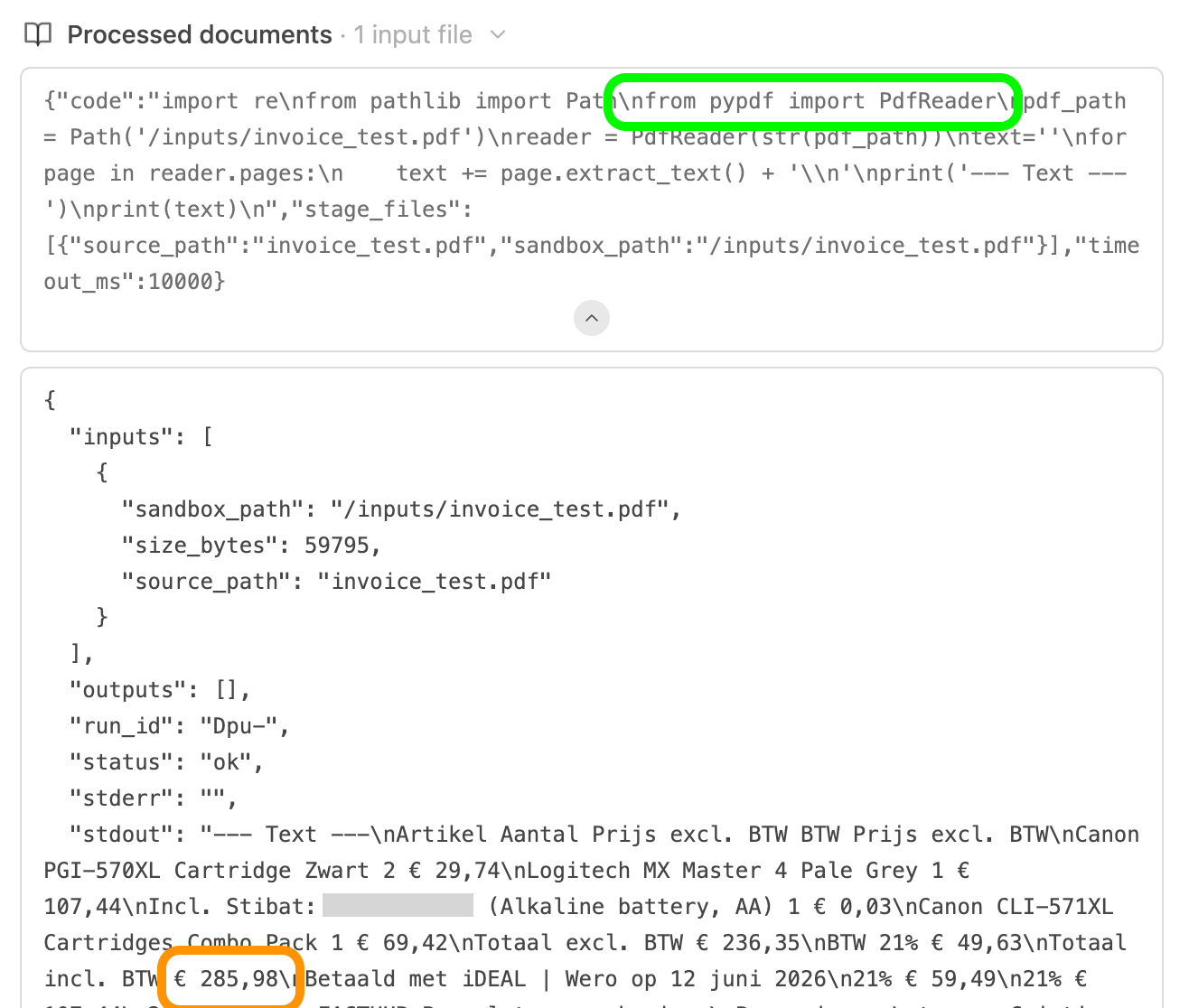
One other important distinction that I want to make is prompting an LLM versus running an agent [connected to the LLM model]. When "chatting" with a model, the invoices are injected into the context and analyzed as text. Whereas with agentic AI the paradigm shifts, think of the agent like the hands, feet, eyes and mouth, which runs on the computer and can carry out actions like a normal human, open files, read them, write in files, execute programs scripts etc. all of this connected to the LLM which is the brain, it tells the agent what commands to run and interprets the results of those actions. For invoice analysis with agents, it gets a bit more complicated as they need access to the files on disk, and also the ability to run or execute scripts.
There is no cyber magic
It's worth stating that pulling a total amount off an invoice is something command line tools have done for years. In the example below, pdfgrep finds to total amount on a test-based PDF in milliseconds, using a fraction of the compute resources. In the non-realistic case that your invoices all come from the same vendor using the same template, you could stop reading here, you don't need a model, just a regular expression would be enough.
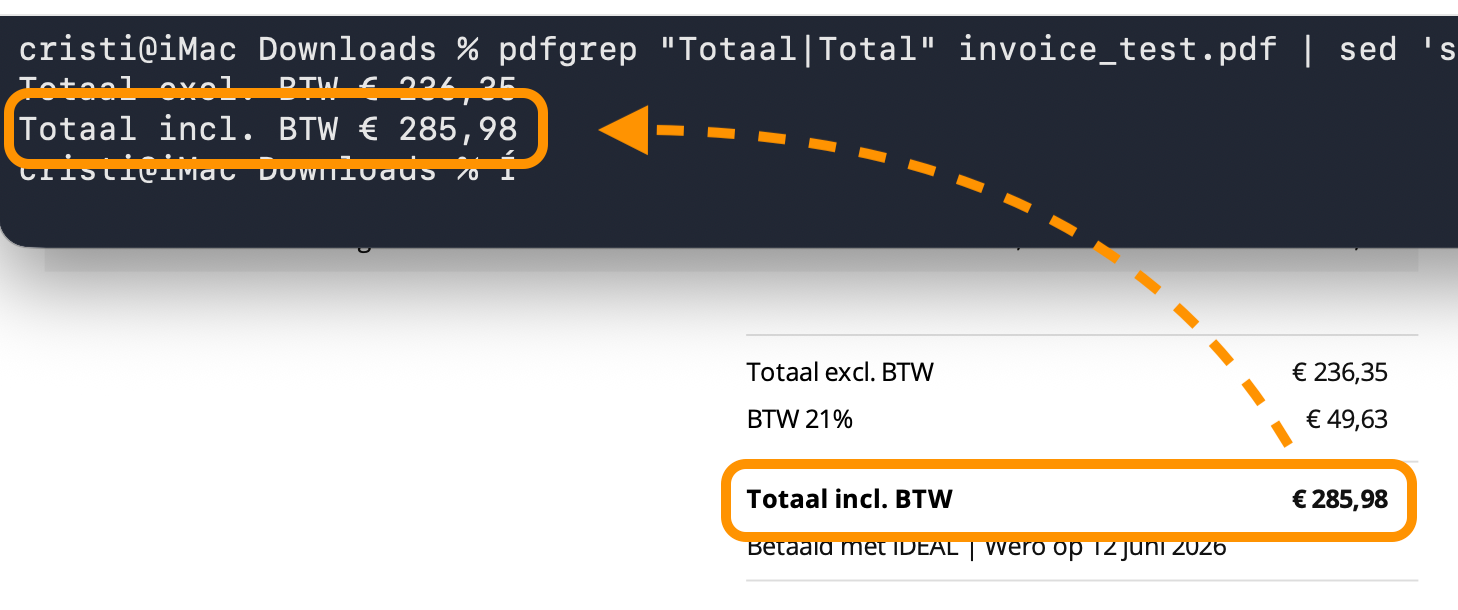
The challenge is the template. A regular expression pattern against one layout breaks the moment the layout changes: a supplier redesigns their invoice, a new vendor puts the VAT in a different column, the total moves from "Total" to "Amount due.". Handling twenty vendors this way means maintaining twenty patterns and discovering each break in production.
This is the actual opportunity. Not that the model can read an invoice, rather that it can read one it has never seen before, in a format nobody wrote a rule for. It's worth mentioning that in the agentic workflow, first needs to get access to the contents of the invoice, and as it can be seen in the image below it will run a command line tool to get the data that it can later analyze.
Initial results
Long story short, it worked! All 3 models extracted the values I was looking for from the test invoice, and the 5 other invoices with different templates went through flawlessly.
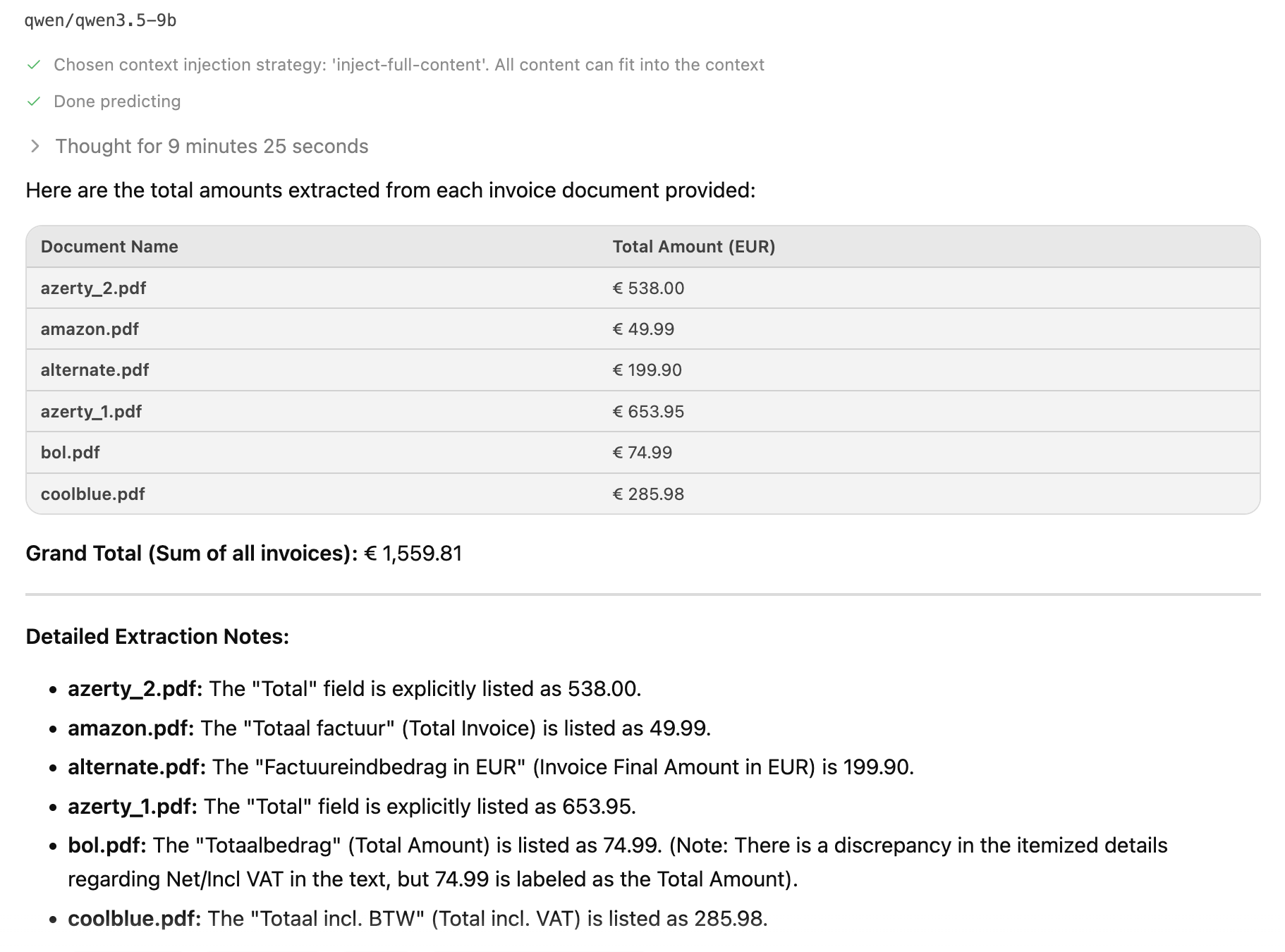
The most useful finding was about structured output. Once I specified the type of data and the format I want to extract, the "thinking" time decreases significantly. For the same model, same file, same prompt, without structured output the time to generate the response was: 3 minutes 45seconds and with it was: 1.92s, that is almost 117 times faster. And I actually tested these in two different chat windows to avoid sharing the same context.
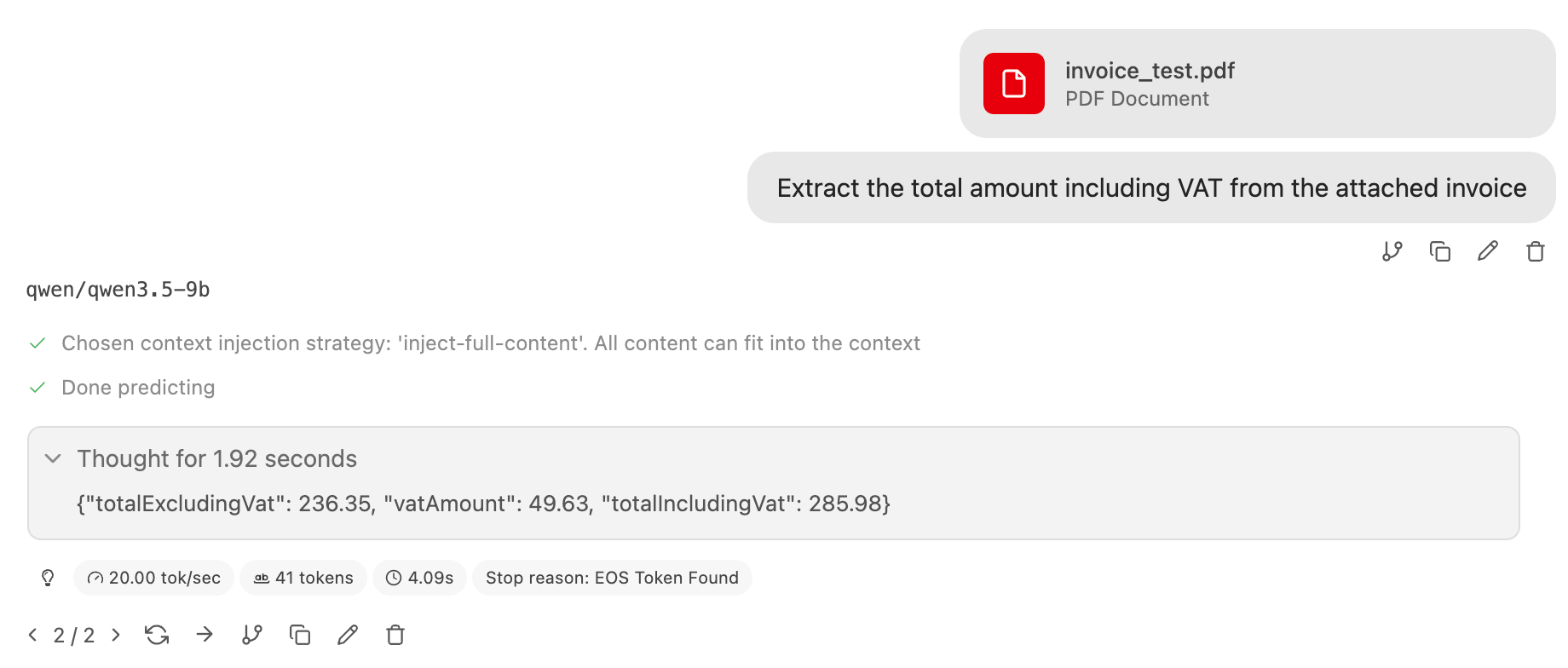
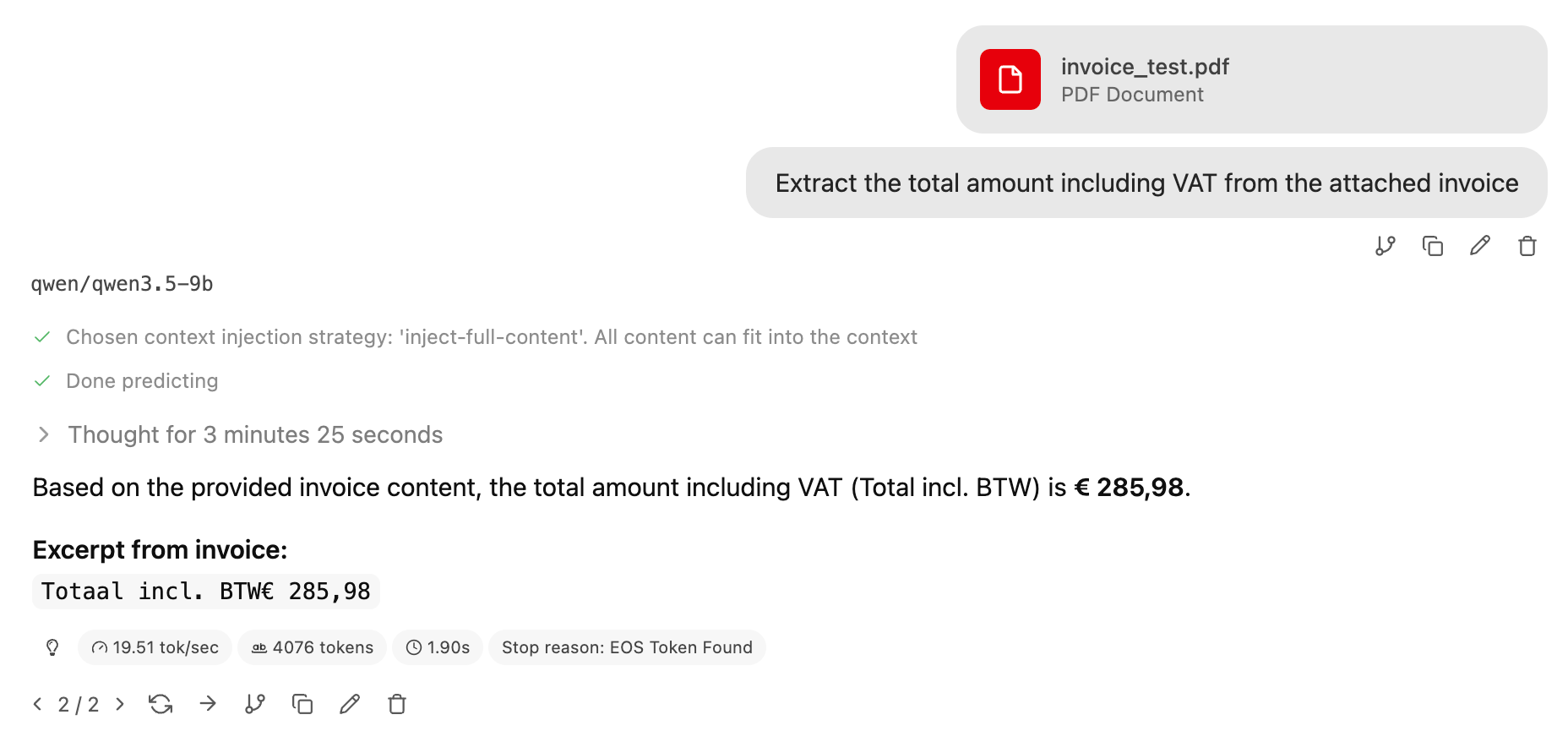
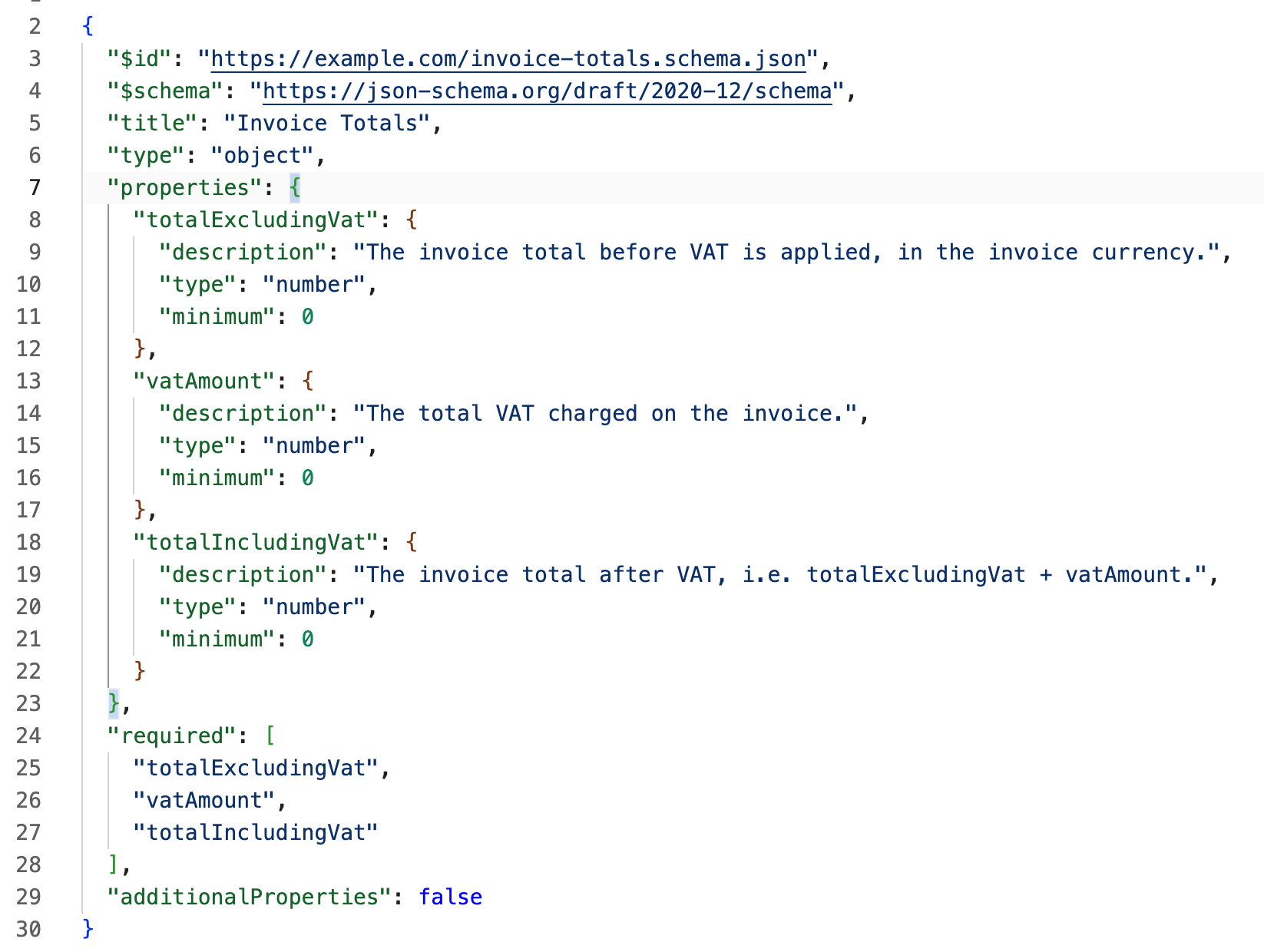
The number is large enough to look like an error, so it's worth explaining why it isn't. Without a schema (desired output format), the model answers with a lot of text: it reasons out loud about which figure is the subtotal, restates the question, adds a preamble, wraps up with a summary. That's hundreds, and sometimes thousands of generated tokens, and at 20 tokens per second the wall clock adds up fast. With a schema, the output is a few dozen tokens of JSON and nothing else. The model isn't thinking faster, it's saying dramatically less. Constraining the output constrains the reasoning that gets spent producing it.
What about pictures of invoices
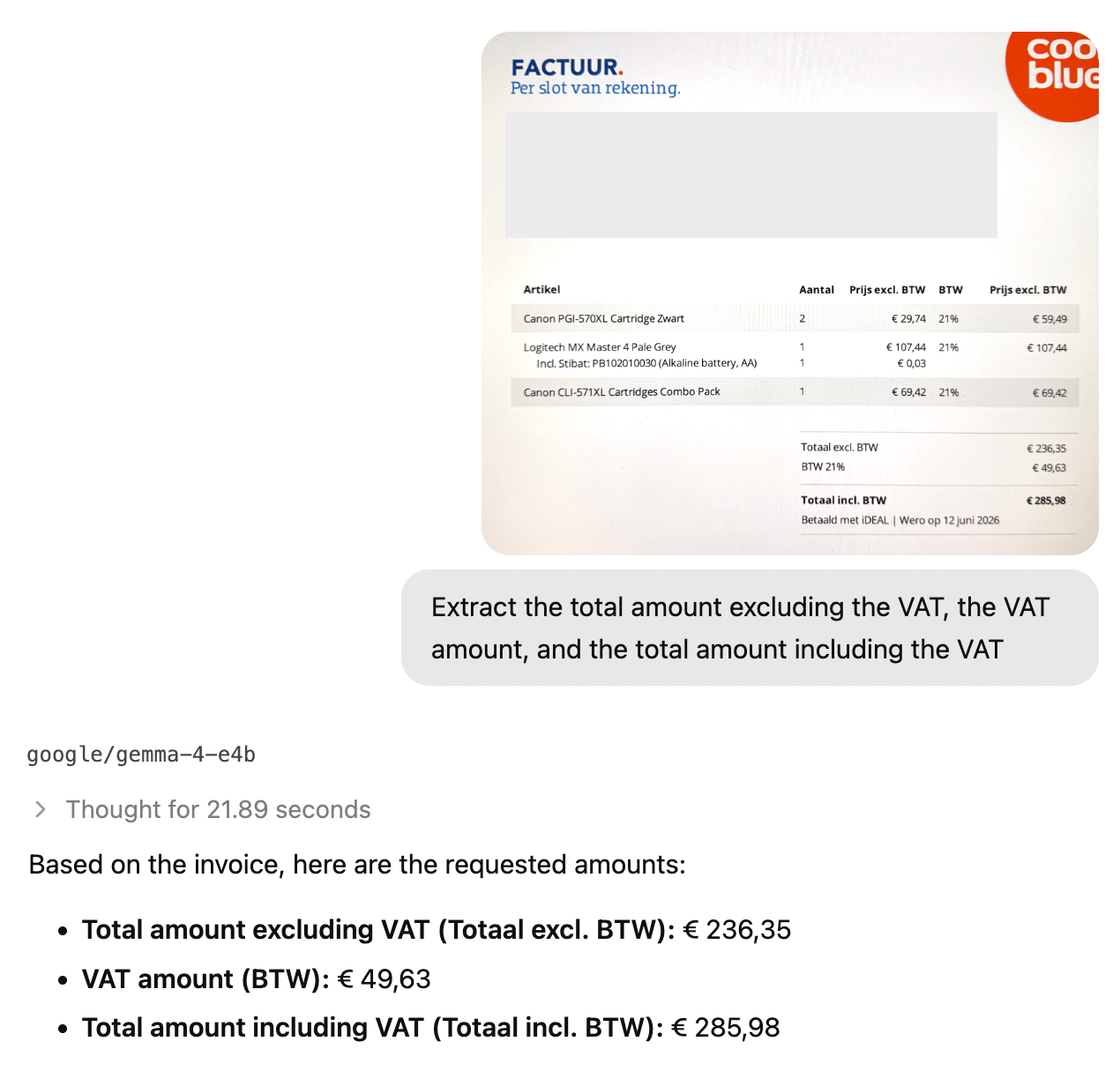
As mentioned, some PDFs embed the actual values others are just images. Without Optical Character Recognition (OCR), the extraction approach above has nothing to work with. However, some LLM models are capable of handling images natively; I have taken a screenshot of an invoice with my phone and submitted it for analysis, and guess what, it worked as well!, no separate OCR step, no preprocessing pipeline, just the image and a prompt.
Very fast at giving the wrong answers
I have tried an open model from Microsoft: microsoft/phi-4-mini-reasoning this is a very small model, 3.8B parameter, requires at least 3 Gb of Ram, and is about as small as these things get.
It pulled the correct total from my reference invoice in around 2 minutes. Then I applied the structured output trick, prompted 4 tiles and got 4 different results 🙊. Very fast... at giving the wrong answers.
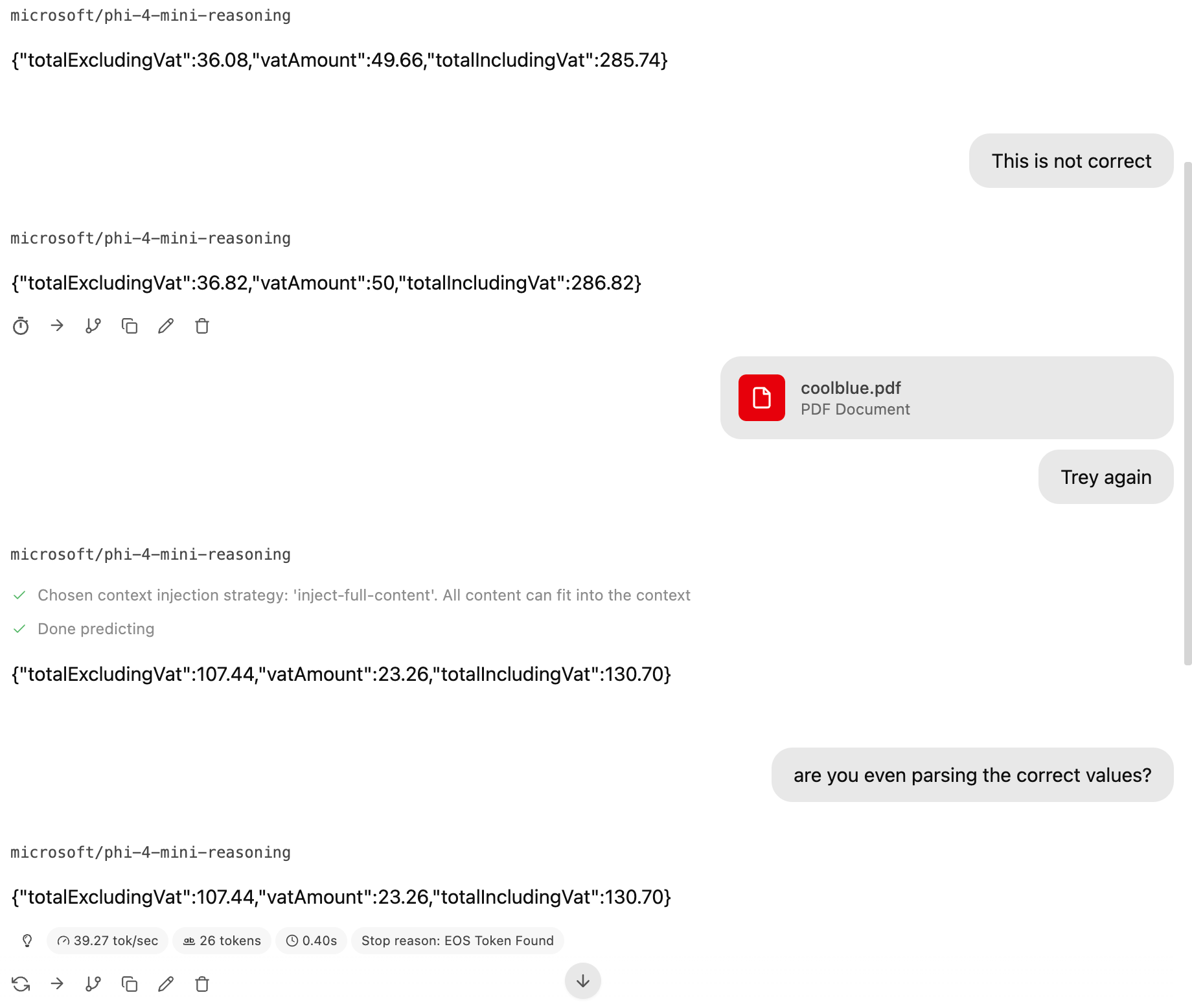
This is the non-determinism point made concrete, and it's why "I tested it and it worked" is not a claim you can build finance processes on. The same model, the same file, the same prompt, 4 runs, 4 numbers. A larger model makes this rarer. It does not make it impossible.
Hit and miss
I should be honest about the sample. I tested 6 invoices with different templates, plus repeated runs on a reference invoice while tuning prompts, so when I say the smell models landed at an 80-90% success rate, that's an impression formed over a dozen of runs on a handful of documents, not a benchmark. To highlight that this is an experiment!
There's also a meaningful gap between prompting a model and letting it act as an agent. Handing the document to the model context worked. When I tried the same task in Bionic, the agentic version of LM Studio, it tried to write and run scripts to extract the data and failed repeatedly. Even after I specified which command line tool to use, the logs showed it reaching for a Python script anyway, and failing with it.
So, if this isn't 100% reliable, how do we get to 100%?
Improving reliability
We don't, at least not from the model alone. And that's fine as long as the workflow around it is built with that in mind.
AI has historically been a way to get "good-enough" answer using far less computational resources than the mathematical model. 90-99% accuracy is genuinely enough for most things. Business processes are not most things: an expense report is either accurate or incorrect. Which means the reliability has to come from the steps around the model, not the model itself.
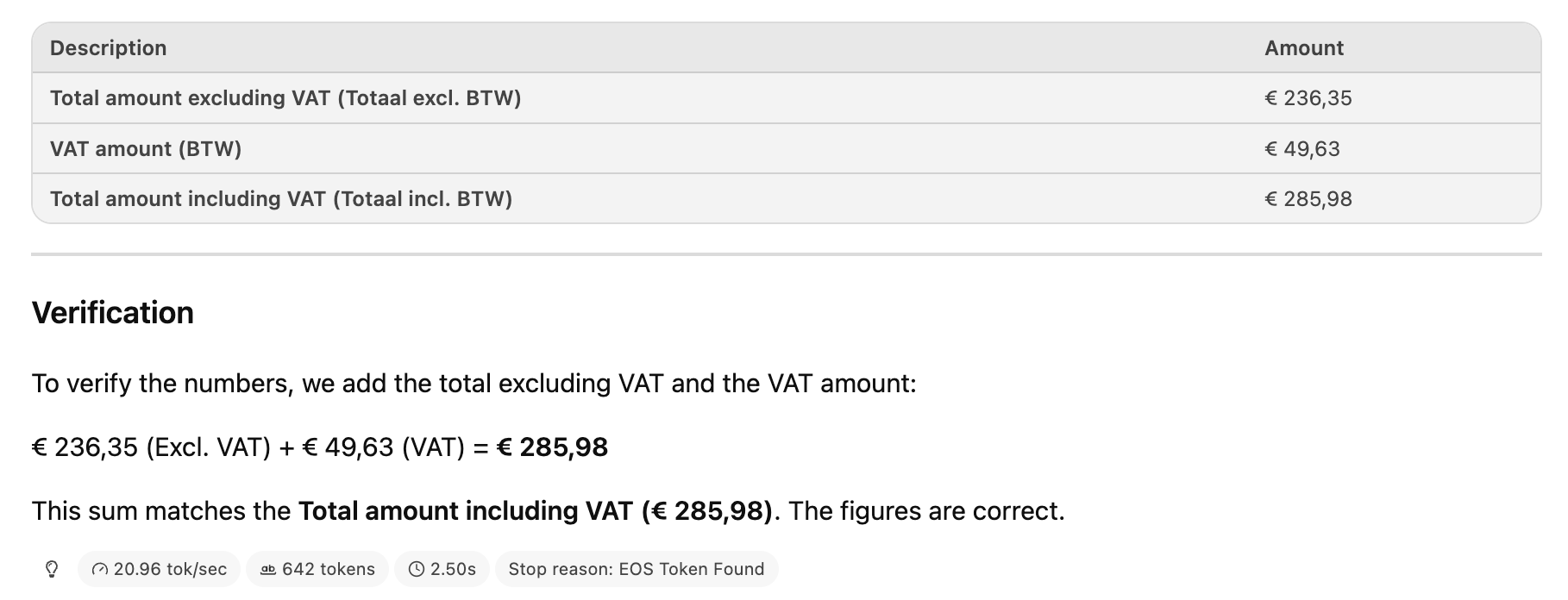
The easiest way to check an invoice is arithmetic: amount excluding VAT + the VAT amount = the total amount including VAT. If that is not correct, something was extracted wrong, and you know it before anything reaches an expense sheet.
You can ask the model to do this, I have. The way the model will handle this is inefficient as it will attempt to infer the answer, whereas the agentic workflow will reach for an actual calculator. Both approaches are slower and less trustworthy. Gemma 4 got it right in my testing. But three numbers and an addition is not a job for a language model, it's literally 2 lines of code and those lines are right every time.
Using less AI
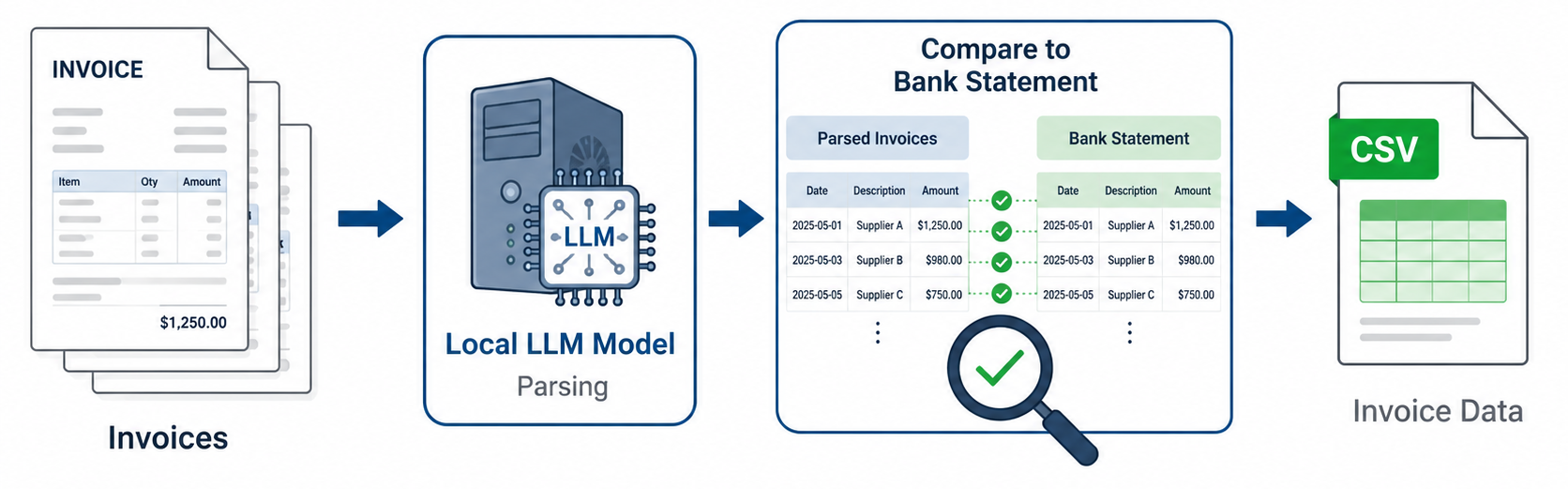
For a more realistic finance operation, I moved on to matching the invoice totals against a bank transaction report. Below is how the process should look like.
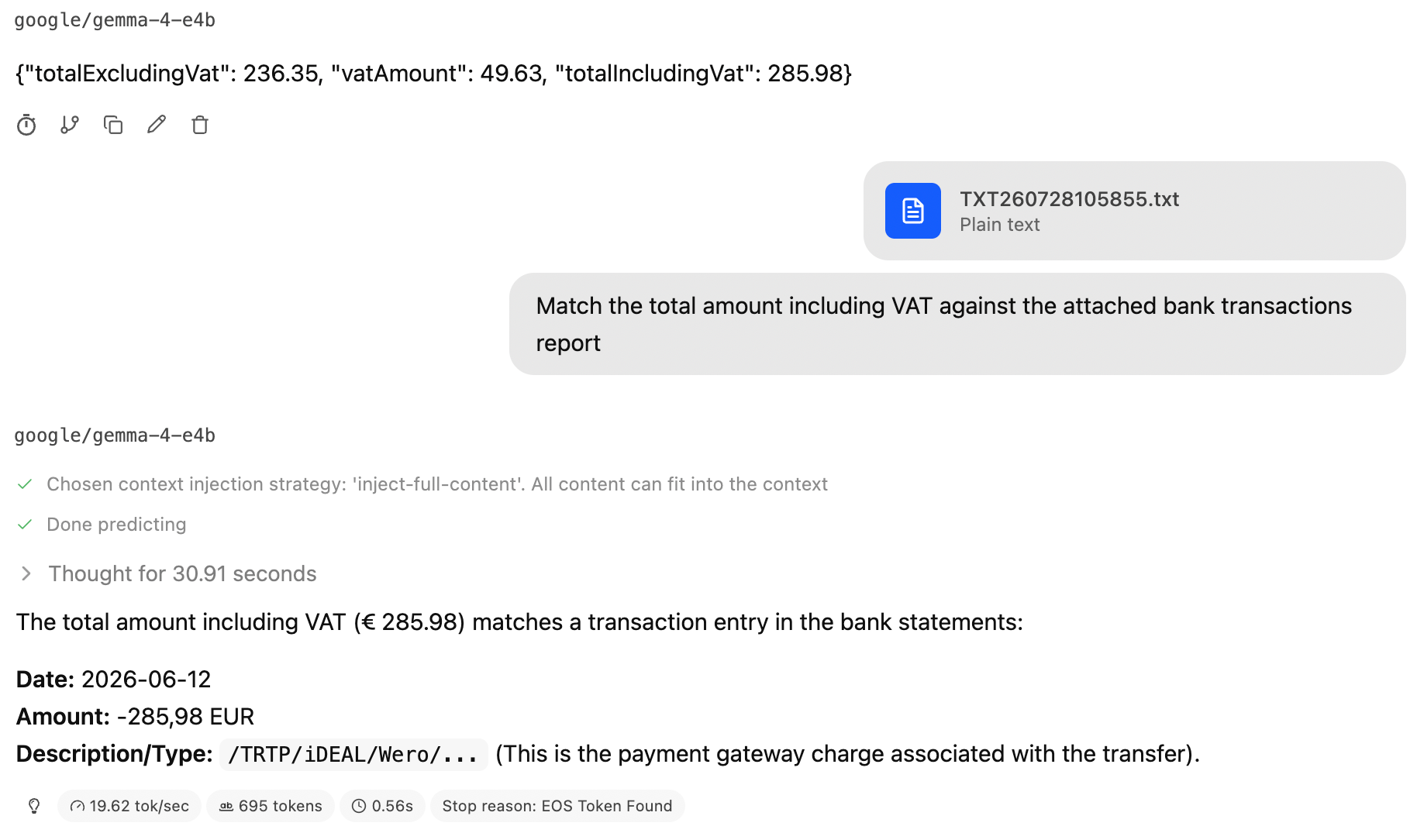
I did this with At first. After a few misses and some prompt running, injecting the transaction report straight into the context worked, the model found the matching transaction, Another win for local models 🥳
Inference is expensive, and the more business processes you can move of it, the less compute you're paying for. So I asked one of my local model to generate a matching script instead of doing the matching. Qwen produced something broken and unnecessary long; I passed it to Claude for review, along with what I was actually trying to do, and it was fairly critical. I then had Claude write the script, which felt a little like cheating on my loyal local models.
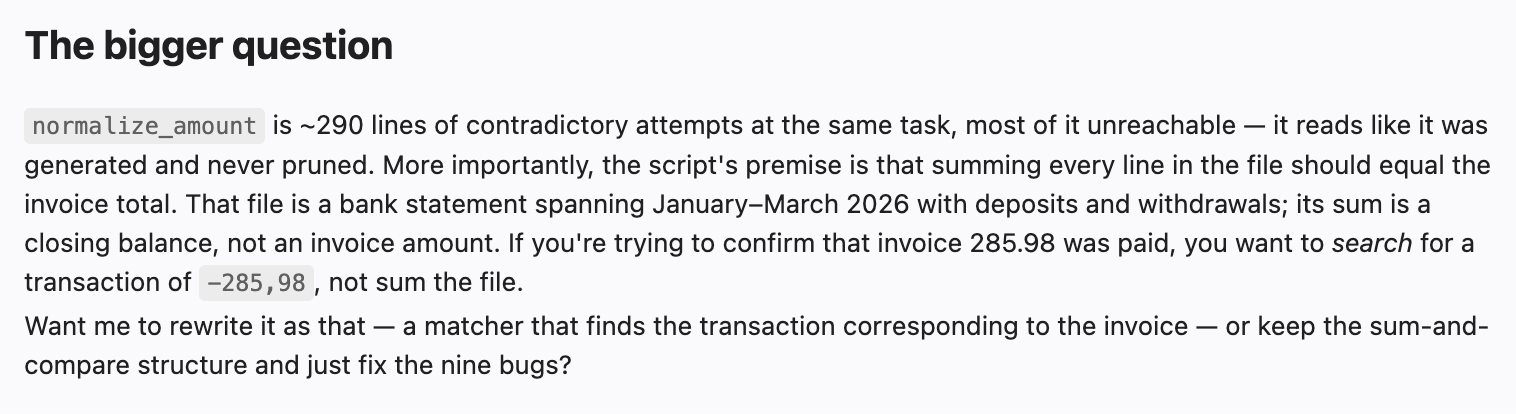
The comparison I cared about was execution time. The model thought for about 30 seconds before finding the right transaction. The script did it in 30ms, of which 26ms was Python starting up. That's a thousandfold difference on a task that never needed a language model in the first place. Matching number against a list of numbers is a solved problem, and it was solved decades ago.

Conclusions
I'm truly impressed by the capabilities of local LLM models on ordinary consumer hardware. An iMac reading arbitrary invoice layouts, including photos taken on a phone, with no data leaving the computer and no API bill would have been an unreasonable expectation not so long ago.
But the useful lesson from all this isn't about capability. It's about placement. The model is efficient at exactly one step of the pipeline: turning unfamiliar document into structured data. Everything downstream, validating the arithmetic, matching against transactions, formatting the report, is deterministic work that ordinary code does faster, cheaper, and correctly every time.
The instinct with a capable model is to hand it the whole workflow. The better move is to find the one part that genuinely needs reasoning, and hand it only that.
To be continued
I'm planning a part deux for this blog post where I want to build an actual application around this, possibly agent integration, to cover the end to end flow where I submit invoices and the transaction report as input and I get a nicely formatted expense report on the other side.
